(208) 475.3192

GET A QUOTE | FAQS

Web design & marketing blog Email or bookmark this page

Straightforward design, marketing and technical advice for making your Website more efficient and productive.

Reach more people   Communicate more effectively   Reduce cost

Using Conformity to Communicate The Uniquness of Your Company

August 8th, 2011
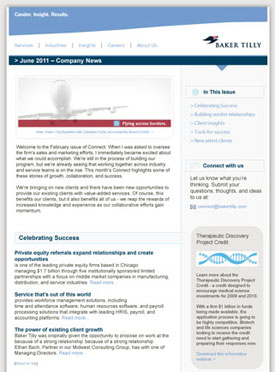
Baker Tilly Email Design

A great example of the the principles of consistency and conformity is the email template we designed for Baker Tilly. Compare the email design with the graphic identity of their existing Website.

Seth Godin’s blog posts are always profound, but his most recent post Bypassing the Leap is especially relevant to the services we provide. The gist of his post is that most of the time creativity is the act of reinterpreting and reassembling elements that are already well accepted and proven to work.

Effective branding and design services are based from this same perspective. While it may sound contradictory, quality creative products are almost always intentionally designed to conform within well established boundaries.

No matter how unique of graphic identity a corporation has, you’ll find the logo almost always in the upper left and the main site navigation in one of two locations. This is staying within the proven boundaries of usability. When Fortune 500 corporations spend hundreds of thousands of dollars to develop their branding and identity all marketing publications will almost always have identical colors, layout and typeface. This is adhering to the core principle of graphic design—consistency. Corporations conform to the principles of usability and consistency because they know they’re the most effective way to communicate a credible message and the most effective way to persuade their customers to action.

Embracing conformity to communicate uniqueness is really the secret of success when it comes to marketing communication and application design. 

Many small and mid-sized companies don’t get this. Have you ever found a Website through Google that you thought might be a good solution for a need only to have second thoughts when their Website design looked dated, amateur or unclear?  No matter how unique and appealing their solution may be, if their graphic design and usability do not establish unwavering credibility you’re likely to just head back to Google to search for an alternative.

Small and mid-sized companies have a great opportunity to level the playing field against even massive competitors by communicating their unique value message by conforming to already accepted and proven principles.

Does your marketing communication produce credibility or doubt? Ask ten people outside your organization that you can trust to give you honest opinions about their impressions of your Website, emails or other marketing material. If you need an objective professional opinion let us know. The one thing you’ll get is honesty and there’s no obligation. If you do decide for yourself that your identity needs a makeover we provide consulting as well as in-house development and design services. You can call us at 866.770.7967 or through our online form.

Don't add clutter to your Website!

December 2nd, 2010

I want to point out a great post that Seth Godin made today—The inevitable decline due to clutter.

As is his gift, he does a great job of articulating minimalism; a principle of design and communication that has become even more important in this digital communication age.

I’m having a hard time not quoting his whole post because it’s so good, but in the spirit of minimalism here are the best parts:

  • “As digital marketers seek to increase profits, they almost always make the same mistake. They continue to add more clutter, messaging and offers, because, hey, it’s free.”
  • “Once you overload the user, you train them not to pay attention.
  • “More is not always better. In fact, more is almost never better.

Essential Tips for Styling Text Content

January 22nd, 2010

Hints and tips for the styling and layout of your text content

With the vast amount of text being posted online and via social media these days I thought it would be beneficial to share this very brief tutorial for how (and how not) to style all that great stuff you’re sharing online. These tips apply anywhere you might post text—whether it be in one of our content management systems, WordPress, Facebook, Blogger or even old fashioned MS Word, these simple design principles will help insure your message gets the credibility that it deserves.

  1. Learn to use <shift><enter> (Windows) or <shift><return> (Mac) to insert line breaks with no vertical spacing. This practice helps insure you maintain close proximity of related content and greatly aides in readability.
    People often just hit <enter> between lines of text which adds awkward and undesirable vertical space.

    Example using <shift><enter> Example using <enter> only
    My mailing address:

    RisingLine
    111 S. Broadway St
    STE 101
    Boise, ID 83702

    My mailing address:

    RisingLine

    111 S. Broadway St

    STE 101

    Boise, ID 83702

  2. Don’t change typefaces (fonts). In fact you cannot change fonts/typefaces in our CMS text editor but many other text editors allow you to do so. The typefaces for your Website are specified in a single Style Sheet that was developed specifically for your site and insures consistency across all pages of your Website. Consistency in the presentation of your content is a cornerstone of good design.
  3. Don’t change typeface colors. For a professional consistent presentation of your content the colors are controlled through the Style Sheet. Emphasis colors (such as the color of your hyperlinks) have been selected by your professional designer specifically to harmonize with the color palette of your Website.
  4. Use the "font size" selector very very sparingly. Avoid at all costs using the "font size" selector to increase text size. This practice will invariably create inconsistent and amateur rendering of your content which cannot be controlled from the central style sheet. The only reason we retain the font size selector is for those rare occasions where a line of text needs to be reduced in size.
  5. Avoid using "U" Underline to emphasize inline text. People will think the underlined text is a hyperlink. Rather use the "B" (Bold) or "I" (Italic) icons to emphasize a word or sentence.
    For professional and consistent presentation of your content…
    Do Do Not

    News and Announcements

    We are extremely pleased to announce the opening of our second storefront in the beautiful city of San Jose, California. Please join us for our grand opening on April 3rd.

    News and Announcements

    We are extremely pleased to announce the opening of our second storefront in the beautiful city of San Jose, California. Please join us for our grand opening on April 3rd.

  6. Use the "Format" selector to change heading text size and create a logical hierarchy of content. Using this method allows consistent presentation for your site which is controlled by the Style Sheet.

Editing a page

Web Design Perfection

January 20th, 2009

media-templeTo my recollection, I’ve never made mention on this blog of a specific Website as an example of being truly great. While no one has elected me as the design judge of the Internet, nor will any great people likely take notice of this post, I am compelled to call out a Website that I’ve been captivated by for some time and that serves as a great example of the principles that we here at RisingLine advocate every day.

No, it’s not RisingLine.com (although I have to admit I think quite highly of that design), and before I continue I should disclose that I have absolutely no ulterior motive in praising the site I’m about to mention . . . no referral fees, or kickbacks of any kind.

So enough with the rambling, MediaTemple.net is the site to which I am directing my compliments. The first thing a visitor to their site will notice is that graphic design is extremely powerful but not overpowering. . . minimalist, detail oriented, clean, modern, just plain classy. It does what a graphic design is supposed to—provide a professional backdrop to the content of the site which beams credibility without distracting from the message.

I have to assume by the continued proliferation of shabbily designed sites on the Web that many don’t realize just how important design is. As we like mention, over and over, research has shown that a shockingly high percentage of people make a judgment call about the credibility of a company within seconds of visiting a Website based primarily on the graphic design (see the Stanford Web Credibility Research site for more insight on this topic). While my high school history teacher did not find it amusing when I offered to turn in a picture instead of the assigned 1,000 word essay, it really is true that a picture (or for our purposes a design) is worth a 1,000 words of credibility, and all that communicated in the blink of an eye.

A very common misconception is that an effective design is one that has a lot of swirls, colors, moving things and flashy graphics. While those types of sites might be appropriate in some instances (although I can’t think of any of the top of my head) professional Websites have a demanding purpose to concisely communicate value propositions and persuade their prospects to buy. Much Web design we see out there does more to distract from those goals than reach them. Media Temple offers us a great example of a well refined goal-oriented design that delivers their message with just a touch of panache.

Even the best graphic design is of no real use without concise messaging, clear communication flow and easy to understand navigation. These disciplines are collectively known as usability and are achieved exceptionally well by Media Temple. What’s even more impressive in this accomplishment is that the unique value of Media Temple’s hosting solutions are considerably more challenging to communicate than their competitors because they really are unique. Media Temple provides virtualized hosting accounts that are spread across a grid of resources as compared to the typical shared hosting company that sticks customers on a server in their farm to fight with the other squatters for finite resources. Based on my experience using their product, Media Temple’s solutions live up to the grand impression they make on their Website.

While I’m not going to get into the details, the usability of their client-side administration panel and knowledge base impresses me even more than their front end. I recently spent some time in Media Temple’s Grid-Service environment testing the CMS platform we develop on (coincidentally their hosting platform provided the most consistent high performance of any of the many shared hosting environments we’ve tested in) and I had a hard time tearing myself away from their administration panel when our project was complete.

Hats off to Media Temple for their great achievement and many kudos for providing us all a great example of what the Web should look like.

Web Design

April 24th, 2008

Graphic design is the first thing that many Web site owners and managers think about when they seek out the services of a Web developer. There is no denying that the graphic design element of a Web site is important, in fact research shows that design has an immense and immediate effect on your visitors. Within moments, about 1/2 of those visitors will make a judgment on the credibility of your company based solely on the quality of your graphic design. So design is immensely important, just like a foundation is important for a building. The foundation must be solid and it must come first but without the building on top it acheives little.

    Google screen shotWithout design being part of a holistic strategic approach to communication, it becomes impotent. A site with no design will trump the most artistically original site if the former has quality content and offers intuitive and easy to use solutions to its target visitors needs. The classic example is the most visited and arguably most successful Web site in the world: Google.

    Web sites are a lot like people, their success is ultimately based on the value they contain, not their outward appearance. This is vital to understand so that design is put into its proper place. Web design is still important, it just has to be the dressing for content of real value.

    Google is like one of those geniuses who are so recognizable and brilliant that they can get away with wearing an old t-shirt and jeans to deliver a key-note speech. It’s fair to say the brilliance of most of us is not as common knowledge.

    Web design is the same, once the foundation of quality content is present, professional and usable design is an excellent catalyst to facilitate communicating the value of your site. In my next post I’ll get into some specifics about our philosophy and methods for designing Web sites that are modern, appealing and clearly communicate the values of your organization.

    Frappe Free Web Design

    December 11th, 2007

    One of the biggest ROI killing design blunders for any product or publication is over complexity, and Web sites seem to be one of the most common offenders.

    The term usability is used in Web design jargon as the attribute of how easily understandable and navigable a site is, and how readily it meets its target visitors’ needs. Almost without exception, each of the millions of Web sites in cyberspace are designed for very specific tasks for a narrowly defined group of people.

    Osterizer GalaxieYour primary goal as a site owner is to provide a completely intuitive experience for your visiting prospects. In spite of this obvious goal often simplicity becomes lost in unnecessary clutter. When this happens visitors become confused and confused visitors, according to research, tend to make a hasty retreat.

    I ran across a great example of usability in design recently when my ancient Osterizer Galaxie Blender broke. While it had provided many years of satisfactory service, it was always a source of mystery and anxiety to me. I just needed it to perform one simple task—blend. But each time I went to use it I had to wonder at all the buttons on the front:

    Chop (Off) – Grate (Off) – Grind (Off) – Stir – Puree – Whip – Mix – Blend – Frappe – Liquefy

    Am I doing this wrong? Should I be Puree’ing or Frappé’ing this protein shake. And does it matter which off button I push, why are there three? Just for good measure, I would randomly use all the buttons on different
    occasions—all with no noticeable difference to my concoction.

    Osterizer BeehiveIn browsing for a replacement, I came across the polar opposite of the Osterizer  Galaxie—the Oster Classic Beehive. There’s just one switch on the whole thing and that tne switch does just what I need without having to stop and think about which button to push and why.

    While blenders and Web sites don’t have much in common, the design principle illustrated by Osterizer’s two extremes make great litmus tests for the usability of our own sites.

    Now the Beehive looks much cooler than my old Galaxie, I no longer have to hide my blender from guests come over. But the most important thing about well designed
    products or Web sites is not looks (although good design naturally lends itself to better aesthetics) it’s about making the value you offer clear and easy to implement.

    I mentioned Steve Krug probably too much, but I know of no who does a better job of explaining the foundational principles of usability and helping people really “get” what it takes (and doesn’t take) to create an effective revenue producing Web site. If you’re the owner, manager, or administrator of a site I implore you to get your hands on a copy of his classic book, Don’t Make Me Thinklink opens in new window.

    What you should know about Web design

    November 5th, 2007

    Web design, when compared to printed design, has some unique pros and cons. A big “pro” is the flexibility of publishing to the Web. A printed marketing piece is designed once and published—most organizations don’t find it plausible to go back and reword a paragraph after 10,000 copies have already been printed.

    With Web publishing it’s relatively easy to have a Web developer make changes after the initial publication and the cost is nominal. Content Management Systems like our own WebSite 2.0 take this benefit a step further by allowing even those who aren’t trained web developers to easily login to their site and make text and graphic changes.

    On the “con” side of Web publishing a big challenge is insuring your target audience views your publication as you intended. Each type of Web browser interprets how to display any given page of HTML code—for example Internet Explorer may display a page of HTML differently than FireFox or Safari. Noticeable discrepancies can manifest even within different versions of the same browser. So, a site design tested only with Internet Explorer 7 may look great in that browser, but look like a mess in another. While this is a challenge, the risk can be mitigated by testing the majority a site’s design and layout on the most popular browsers which are reported monthly by W3C and presently consist of FireFox, Internet Explorer 6 and Internet Explorer 7.

    Not only should a Web sites appearance in popular browsers be considered, but also the individual operating environment that any given user may set themselves should be taken into consideration. For example, if the default font size is set too small by the designer (a common occurrence in my observation) users may be inclined to increase the text display size in their browsers. When this happens the browser will reformat a Web page to fit the larger text. It’s prudent to first choose a readable text size and then to design a site to look presentable when text size is kicked up a notch or two.

    Another important consideration of your site should be the size of monitor (i.e. the pixel resolution) that your target audience is likely to be using. There are two basic types of design to accommodate this: fixed width and liquid or floating width. There are a lot of considerations when deciding which route to go, but in general, business sites are most often fixed width (as you’ll notice by surging through Fortune 500 sites) with liquid width sites typically being to best suited for sites with lots of text copy…reference sites, academic sites, or blogs for example.

    Business oriented sites often fall into two categories. The first, to take fresh prospects through a sequential process of establishing your credibility/trustworthiness and persuading them to become a customer. The second is accommodating existing clients who are retrieving information, executing transactions, making a payment, viewing schedules, etc. The best practice principles of persuasion and usability lend themselves most often to fixed width design because fixed width designs allow more control over the visual presentation quality and encouraging concise bill-board style statements and discourage verbose copy that statistics show most people don’t read and find counter productive to their goals of being on a site.

    Sometimes, there is an impression that the “white space” displayed to left and right of a fixed width design is undesirable. While each situation is unique, this empty space is often a benefit when attempting to communicate to a Web audience. A computer monitor full of text/graphics dilutes messaging by creating clutter. As Steve Krug points out in his classic, Don’t Make Me Think, one of the most common roadblocks to creating persuasive and effective Web sites is too much copy . . . he advocates designing Web sites with a “billboard” mindset—concise, appealing messages that tell the target visitor what they need to know without having to wade through clutter.

    The white space, which coincidentally is only noticeable on displays larger than the site was optimized for, can in fact create a very desirable mechanism to funnel your prospects attention to the most important statements about your organization. That’s why you may have recalled seeing those full page Wall Street Journal ads, that some deep-pocketed corporation paid a large sum for, that are mostly white space. It’s draws a reader who is being overloaded with pages of information like an oasis in the deserts and captures their full attention.

    At the risk of this post becoming verbose itself, I’ll stop here and post more on this topic in the future. As I’ve done before, I highly recommend that anyone responsible for a professional Web site read the aforementioned book by Steve Krug. It’s not a book about the technicalities of Web design, but provides an invaluable executive guide to understand the fundamentals of an effective and profitable Web site.

    Avoid Site Monkeys

    February 14th, 2007

    Imagine driving down the freeway…you see a billboard with a message about an accountant specializing in international business, just what you’ve been looking for! As you start to read a few sentences at 70 mph, a giant helium-filled monkey that’s anchored in place next to the billboard begins clashing it’s synthetic cymbals while cables retract and expand it’s eyelids. Hey look there’s some sort of logo on the monkey’s shirt for the accounting firm….too late, you’ve sped by the sign.

    Site MonkeyAs ridiculous as this example sounds, it’s exactly what happens many times on websites. We find a site in a Google search that looks like it might be what we’re after, but on its front page were confronted by too many snippets of ambiguous information and distractions and no clear statements of what this site is about.

    One of the most ludicrous distracting features that I’ve seen recently is “SitePal.” A zombie-like animated talking head that speaks in slow broken computer generated speech…”Welcome (octave lower) to our Website (two octaves higher) Please mouse over my (pause) face to make me talk. What’s even creepier is that on some versions the characters head slightly bobbles and it’s eyes cross as it attempts to follow your mouse movements.

    Having some sort of animated or technical feature on a site can be tempting for its novelty factor. But just because something can be done does not mean that it should be done. Research has consistently shown that superfluous elements are often detrimental to the overall communication and persuasion goals of web sites. For
    access to solid research on the topic visit the  Stanford Web Credibility ResearchOpens in new window site or, in keeping with the theme of efficient communication, check out the all-time classic, Don’t Make Me Think, by Steve Krug.

    Subscribe:

    EMAIL:


    RSS subscription options RSS[?]

    QR tag

    Stream our blog on your iPhone—download Bloapp then scan the QR code above.

    Recent Posts

    Categories

    Archives